
HabTech AS
Visual countdown timer
A visual countdown timer contributes to predictability and is particularly suitable for activities that do not have a clear start or end. For many, such a timer will help make the activity more clear and prepare the e-plan user when the activity is nearing its end.
Visual countdown timers are a frequently used feature and are often used to clarify time in activities such as brushing teeth, cooking/baking time, or time spent playing computer games, for example.
Expert tips!
Visual timers can also be used to practice persistence in less attractive but necessary activities (e.g. brushing teeth).
By starting with short time intervals of mastery, the time can gradually be extended as the activity is mastered.


Admin mode
How to activate a countdown on an activity
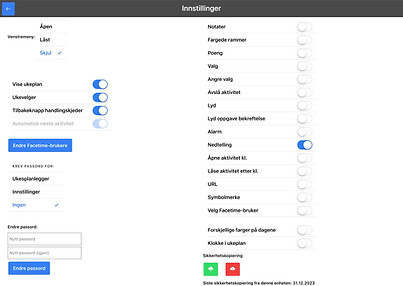
Settings
Check that the function switch you want is activated. This is shown by the switch turning blue.

Design of individual activities
Press the switch so it turns blue. Press the line where it says e.g. 00:00. Adjust to the desired time interval. 2 minutes is set as 02:00. Press save on the "timer box" and finally "Save" (green button at the top) when the activity has been adjusted.